| HOME | ONLINE ORDER |
Making a PayPal Payment
After submitting the form, you will get an eMail from PayPal
similar to this. To make the payment, just click the link in the eMail
| Octatec Ltd (jeromy@octatec.co.uk) would like to be paid through PayPal.
------------------------------
Amount: $XX.XX PayPal makes it easy to send money by email to Octatec Ltd
To view the details of this Money Request or to pay Octatec Ltd with
https://www.paypal.com/prq/id=XXXXXXXXXXXXXXXXXXXXXXXXXXX Thank you for using PayPal! The PayPal Team |
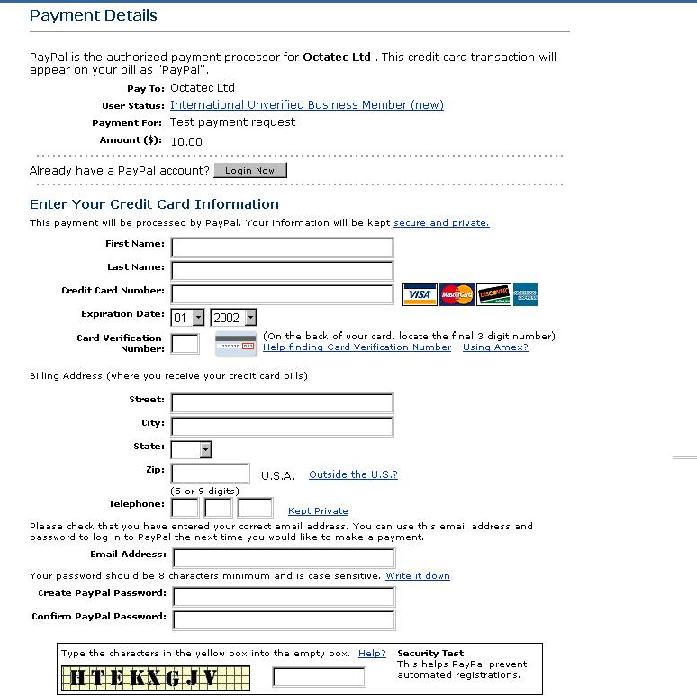
After clicking the link, you should get a screen like this. Assuming you are not a PayPal member already, just fill in the form and continue to the next page. If you are a PayPal member already, you'll know what to do. Filling in the form will initiate the payment to us, and it will make you a PayPal member. Being a PayPal member doesn't cost you anything, and it will make paying through PayPal easier the next time you do it.
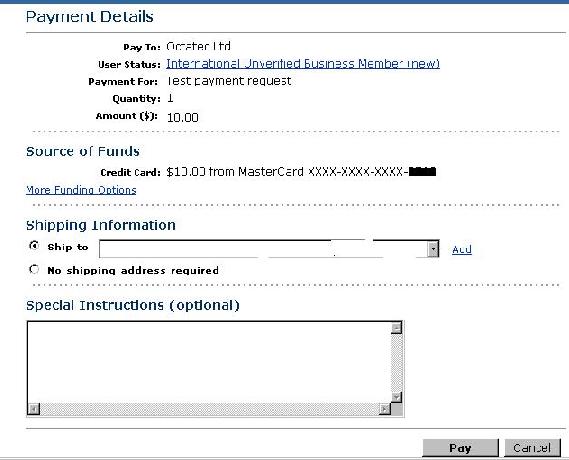
After filling in this form, continue to the next page where you will see a simple confirmation screen. If all the details are correct, just click the pay button, and that's it.
You don't need to worry about shipping addresses as the software is downloaded via the internet. As soon as PayPal informs us you've paid, we will send you an eMail telling you how to download the full version of the software.